
Choose dinner nights
Decide which evenings need a PrepWeek dinner and which are already covered by plans, leftovers, or eating out.
Plan dinner, then shop once
PrepWeek is the grocery list app that turns the dinners you choose into one categorized shopping list. Ingredient quantities follow the portions and meal groups in your weekly plan, so the app can rebuild the list when what you intend to cook changes.
No account required. Your plan and shopping state stay on your device.
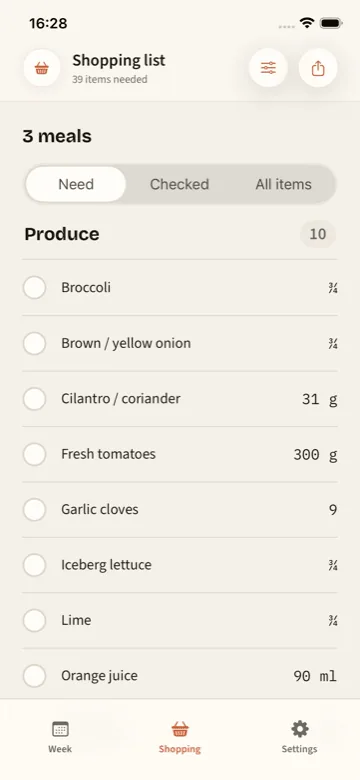
From plan to trolley
When recipes, portions, and shopping live in separate places, every change creates more work. PrepWeek derives the shopping list from the Current Plan, so replacing a meal or changing the number of portions rebuilds what you need within the same workflow.
Decide which evenings need a PrepWeek dinner and which are already covered by plans, leftovers, or eating out.
Pick practical meals for the meal groups in your week. Each group knows how many dinner portions it needs.
Compatible quantities for the same grocery item are consolidated instead of appearing as repeated recipe lines.
View what is still needed, review checked items, or filter the list down to one meal group when you are shopping in stages.
Useful list details
The full-week view is designed for one shopping trip. Meal-group filters make the same grocery list useful when you only want to buy for the next recipe.
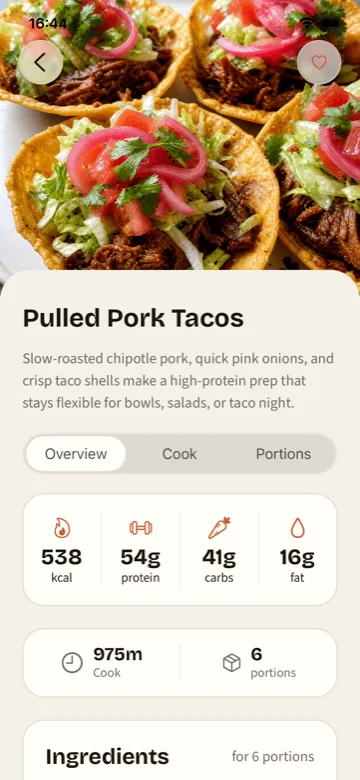
The recipe stays attached. Move from a grocery item back to the meal details and cooking guidance that explain why it is on the list.
A simple example
Imagine that Monday and Tuesday share a chicken recipe, while Thursday and Friday share a lentil curry. PrepWeek scales each recipe to the portions required, then combines the ingredients into one shopping list.
Meal group one
Chicken, rice, peppers, spring onions, garlic, and sauce ingredients scaled to the people and nights in the plan.
Meal group two
Lentils, tomatoes, aromatics, spices, and sides for the second batch of the week.
The shopping list
Produce, protein, tins, grains, dairy, spices, and pantry items shown together, with compatible quantities consolidated.
Complete the planning loop
See how dinner planning, recipes, portions, cook mode, and shopping connect.
Start with nightsBuild the schedule and meal groups that determine what the grocery list needs.
Start with foodBrowse complete recipes with ingredients, timings, nutrition, and storage guidance.
Step-by-step guideLearn how to scale portions, combine compatible ingredients, group aisles, and check the kitchen.
Building the list by hand?
The step-by-step guide covers scaling recipes, combining compatible ingredients, checking the kitchen, and grouping the finished list by aisle.
Plan, then shop
Make the weekly plan, scale the portions, and let PrepWeek consolidate the shopping list before you reach the shop.
Download PrepWeek