
The short answer
Six alternatives, six different reasons to switch.
PrepWeek is the best MealPrepPro alternative for dinner-first planning without calorie or macro tracking. Choose Mealime for fast curated recipes and grocery integrations, ReciMe for social recipe imports, Plan to Eat for a personal recipe calendar, Samsung Food for a broad cross-platform ecosystem, or Paprika for a one-time-purchase recipe manager.
| App | Best when you want… | Price snapshot |
|---|---|---|
| PrepWeek | Dinner-only planning around the nights you actually cook | First plan free; Pro $7.99/month or $29.99/year in the US |
| Mealime | Quick curated recipes and grocery integrations | Free; Pro $2.99/month in the US |
| ReciMe | Importing recipes from social posts and the web | Free; US App Store lists multiple Plus in-app-purchase prices, including $39.99; confirm the current annual price on the listing |
| Plan to Eat | Planning from a personal recipe collection | $5.95/month or $49/year |
| Samsung Food | Recipe discovery, nutrition, and cross-platform breadth | Free; Food+ $59.99/year in the US |
| Paprika Recipe Manager | Owning and organizing recipes without a subscription | One-time purchase per platform |
See the workflow
From an undecided week to one shopping list.
These are real PrepWeek screens. Pick the meals that fit, see how they cover the week, then shop from the list built from that plan.
Swipe to see all three screens →
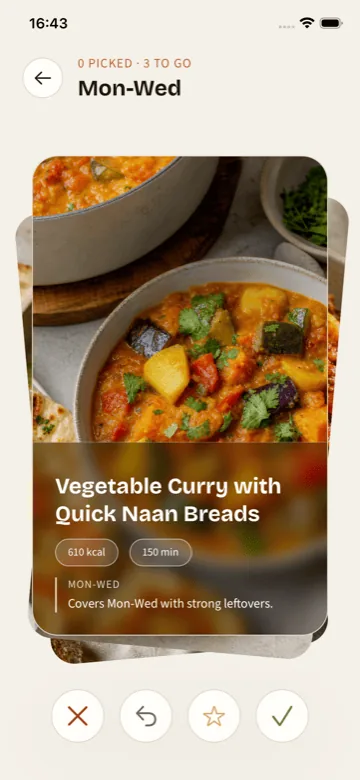
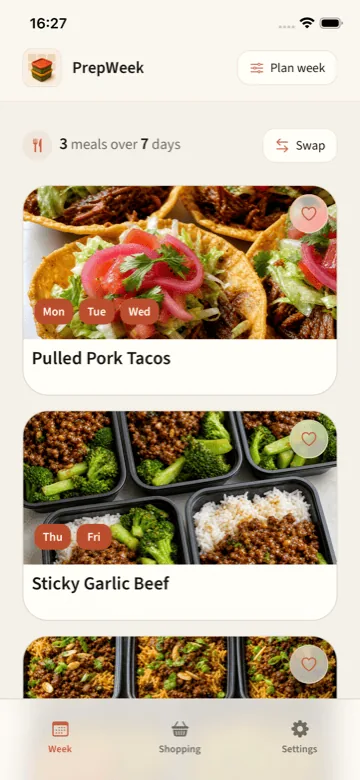
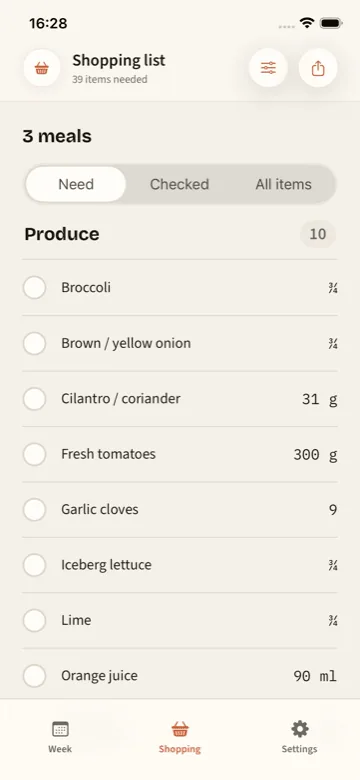
First plan free. No account required.
Try PrepWeek on iPhoneWhy look elsewhere?
MealPrepPro is good at its chosen job. You may need a different job done.
MealPrepPro is best for people who want meal prep tied to calorie, macro, fitness, or nutrition goals across breakfast, lunch, dinner, and snacks. That strength does not make it the default answer for every home cook.
- You only need dinners planned and do not want every meal tied to calorie or macro targets.
- You want to import recipes you already trust rather than follow a supplied meal-plan catalog.
- You prefer a one-time purchase, a broader free ecosystem, or a different subscription model.
- You want less setup: no body goals, nutrition targets, or full-day meal schedule before the week feels useful.
The alternatives
Six apps worth comparing with MealPrepPro.
Alternative
PrepWeek
How it plans: Choose the dinner nights first, including off-plan evenings, then pick batch-friendly recipes.
What to know: iPhone only; it does not import personal recipes, track calories, manage a pantry, or connect to grocery delivery.
Pricing: First plan free; PrepWeek Pro is $7.99 per month with a 3-day trial or $29.99 per year in the US, with App Store pricing varying by region.
Alternative
Mealime
How it plans: Build a plan manually or use an auto-builder shaped by diet, allergies, dislikes, serving size, and other filters.
What to know: The product covers a broader health and shopping workflow; users seeking a dinner-only, no-account planner may prefer something narrower.
Pricing: Free to download; Mealime Pro was $2.99 per month in the US when verified.
Alternative
ReciMe
How it plans: Place recipes from personal Cookbooks into breakfast, lunch, dinner, or snack slots on a weekly calendar.
What to know: Recipe collection comes before planning, so it can be more setup than someone wants when they need the app to help choose dinner.
Pricing: Free plan with up to five imports per week; ReciMe Plus includes a 7-day trial, and its US App Store listing shows multiple ReciMe Plus in-app-purchase prices including $39.99, so confirm the current annual figure on the listing.
Alternative
Plan to Eat
How it plans: Import and organize personal recipes, place them on a flexible calendar, and reuse saved plans.
What to know: It asks the user to curate and manage the recipe library instead of narrowing dinner choices for them.
Pricing: $5.95 per month or $49 per year on the official website; 14-day trial without a card.
Alternative
Samsung Food
How it plans: Recipe discovery and saving plus weekly planning; Food+ adds tailored seven-day plans and templates.
What to know: The breadth can feel like more product than someone needs for one calm weekly dinner decision.
Pricing: Free core product; Food+ includes a 7-day trial and was $59.99 per year in the US when verified.
Alternative
Paprika Recipe Manager
How it plans: Add personal recipes to daily, weekly, or monthly calendars and reusable menus.
What to know: Paprika supplies tools rather than meal suggestions; the user still chooses, imports, and schedules everything.
Pricing: One-time purchase per platform; each iOS, Android, macOS, and Windows version is sold separately.
Direct comparison
PrepWeek vs MealPrepPro
Neither app is better at everything. MealPrepPro and PrepWeek simply start with different problems.
| Area | MealPrepPro | PrepWeek | What it means |
|---|---|---|---|
| Primary job | Build nutrition-aware meal-prep plans around calories, macros, diet, and schedule. | Decide the dinner nights that need coverage, then turn selected recipes into a plan and list. | MealPrepPro is the stronger fit when nutrition targets are part of the brief; PrepWeek is intentionally narrower. |
| Planning scope | Breakfast, lunch, dinner, snacks, household members, and several diet-plan styles. | Dinner only, with off-plan nights for leftovers, takeout, or existing commitments. | Choose based on whether breadth feels useful or like more setup. |
| Batch cooking | Choose cooking frequency and prepare extra portions within a personalized plan. | Meal Groups deliberately let one batch-friendly recipe cover adjacent dinner nights. | Both support advance cooking, but PrepWeek makes repeated dinner coverage the visible week structure. |
| Nutrition | Calories and macros are central inputs and recipes adapt to health goals. | Nutrition is shown with recipes, but there is no calorie logging or macro target. | MealPrepPro wins for fitness-led planning; PrepWeek fits people avoiding diet-app behavior. |
| Account and platform | Account-based experience on iPhone, iPad, and Android. | No account required to create the first plan; currently iPhone only. | MealPrepPro offers wider platform support. PrepWeek has lower initial setup. |
Common questions
Useful answers before you start.
Is there a free alternative to MealPrepPro?
Yes. PrepWeek lets you make your first dinner plan free without an account. MealPrepPro offers a 7-day free trial followed by an auto-renewing annual subscription, with prices varying by country.
What are the best apps like MealPrepPro?
PrepWeek is a fit for dinner-only planning without calorie tracking. Mealime focuses on quick curated recipes, ReciMe on recipe imports, Plan to Eat and Paprika on personal recipe libraries, and Samsung Food on a broad planning ecosystem.
Can I meal prep without tracking calories or macros?
Yes. PrepWeek is built for people who want the week’s dinners decided without calorie tracking, while MealPrepPro is best for people who want meal prep tied to calorie, macro, fitness, or nutrition goals.
How is PrepWeek different from MealPrepPro?
PrepWeek starts with the dinner nights that need coverage, including off-plan evenings, then offers batch-friendly recipes. MealPrepPro builds full-day personalized plans around calories, macros, diet, allergies, dislikes, schedule, and household members.
The honest verdict
Who should choose which app?
MealPrepPro is the better fit if…
- Calories or macro targets should shape every meal.
- You want breakfast, lunch, dinner, and snacks in one nutrition-led plan.
- Android or iPad support is essential.
- Fitness goals and multiple household nutrition profiles matter more than a dinner-only workflow.
PrepWeek is the better fit if…
- The recurring question is simply “what are we eating for dinner this week?”
- Your week includes leftovers, takeout, plans, or nights that should stay off-plan.
- You want batch-friendly dinners and one grocery list without calorie tracking.
- You want to make the first plan on iPhone without creating an account.
What switching involves
PrepWeek does not import MealPrepPro plans, recipe libraries, nutrition history, or account data. You will start a new dinner plan from PrepWeek’s curated catalog. If keeping existing recipes or history matters, stay with MealPrepPro or choose an app built around importing.
Sources
Facts checked against first-party documentation
We use official product and help pages for factual statements. The “best for” conclusions are PrepWeek’s editorial interpretation.
- MealPrepPro overview and pricing
- MealPrepPro plan creator
- PrepWeek meal prep app
- Mealime getting started guide
- Mealime Pro features
- Mealime App Store pricing
- What ReciMe does
- ReciMe meal planning guide
- ReciMe free and paid plans
- ReciMe App Store pricing
- Plan to Eat product overview
- Plan to Eat pricing
- Samsung Food+ features and pricing
- Paprika iOS user guide
- Paprika platform and purchase information